Example 1: Debugging code by printing the value.
Print(node.Abbrev); // Will print out value of the current node.
Handy for debugging.
Example 2: Extracting part of node name. Similar to
ArrayItem() Formula.
return
node.Abbrev.split("_").slice(0,1); // Returns first part of the array.
return
node.Abbrev.split("_").slice(2,3); // returns 3rd part of the array.
OR
return node.Abbrev.split("_")[0]; // Returns first part of the array.
return node.Abbrev.split("_")[2]; // returns 3rd part of the array.
Example 3: Finding when was a hierarchy last updated by
comparing all the nodes of the hierarchies (starting from top node) last update
date.
var dt;
var
childEnumerator = node.Hier.TopNode.GetChildEnumerator();
while(childEnumerator.MoveNext())
{
var propValue =
childEnumerator.GetCurrent().PropValue("Core.NodeLastChangedOn");
if(dt == null || dt<propValue)
dt=propValue;
}
return dt;
Example 4: validating description should not be empty and
should be less than 10 characters. This helps users understand exactly why the
validation failed.
var errm;
var dsr =
node.PropValue("Core.Descr");
if (!dsr)
errm="Description cannot be
empty";
if(dsr.length
>10)
errm="Description should be less than
10 characters.";
if(!errm)
return true;
else
return{
success:false,
parameters:[errm]
}
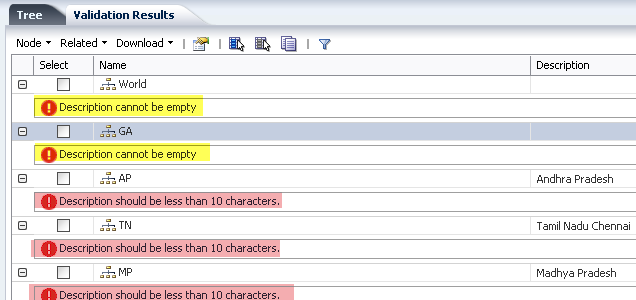 |
| Dynamic error message |
Example 5:This formula tries to find list of all the distinct property values for all the children of a parent node. it helps to identify nodes that have different children with different property values.
while(childEnumerator.MoveNext()) {
var propValue = childEnumerator.GetCurrent().PropValue("Custom.CPRTSchedule");
if(cprt == null)
cprt=propValue;
var re=new RegExp(propValue);
if( re.test(cprt)==false)
cprt=cprt+","+propValue;
}
if(!cprt)
return(node.PropValue("Custom.CPRTSchedule"));
return cprt;
var cprt;
var childEnumerator = node.GetChildEnumerator();while(childEnumerator.MoveNext()) {
var propValue = childEnumerator.GetCurrent().PropValue("Custom.CPRTSchedule");
if(cprt == null)
cprt=propValue;
var re=new RegExp(propValue);
if( re.test(cprt)==false)
cprt=cprt+","+propValue;
}
if(!cprt)
return(node.PropValue("Custom.CPRTSchedule"));
return cprt;


